

For legal work, favor legal-specific AI built on authoritative sources and auditable citations over general-purpose chatbots. Accuracy in this field depends on grounding, not fluency, and grounding means the tool can show you exactly which statute, case, or medical record it drew from. The rest of this guide walks through where these tools actually save hours, what separates trustworthy platforms from risky ones, and how to run a pilot that proves it before you sign a contract.
TL;DR:
- Grounded legal AI tools that cite primary sources prevent hallucinated citations and ensure updates on recent legal rulings or statutes are included.
- Validating that AI systems retain matter context and keep detailed audit logs is crucial for consistent, defensible legal work.
- High-volume practices should prioritize case-management-first platforms that integrate automation for records and drafting within a single environment.
- Total ownership costs include onboarding, integration, review time, and potential migration expenses, which may outweigh initial pricing impressions.
- Verification during procurement requires checking citation traceability, data security compliance, and ensuring the tool suits the firm’s caseload complexity.
Table of Contents
- What Are the Best Use Cases for Legal AI Tools?
- Why Does Legal-Specific, Grounded AI Matter More Than General AI?
- How Should Law Firms Evaluate and Select Legal AI Tools?
- What Does a Realistic Legal AI Implementation Timeline Look Like?
- The Case-Management-First Approach for High-Volume Practices
- What Does Legal AI Actually Cost Once You Account for Everything?
- What Legal Teams Get Wrong About AI Adoption
- Ready to See Case-Management-First AI in Action?
- Sources
- FAQ
What Are the Best Use Cases for Legal AI Tools?
Legal AI earns its keep in a handful of specific workflows, not as a general assistant bolted onto everything a firm does. The clearest wins show up where volume is high and the underlying material is structured enough for a model to parse reliably.
Legal research and cited summaries. Instead of manually pulling case law for a brief, attorneys can ask a grounded AI tool to summarize precedent with linked citations attached to every claim, cutting hours off memo drafting while keeping the paper trail intact for review.
Drafting and redlining. Motions, settlement demands, and contract redlines are repetitive by nature. AI tools built for legal attorneys tend to draft a first pass, flag inconsistent language, and let a human attorney finalize the tone and strategy.
Document review and e-discovery triage. Sorting thousands of pages for relevance used to be junior-associate work measured in weeks. AI models can now flag responsive documents and privileged material for review in a fraction of that time, though a human still needs to confirm the calls.
Medical-records extraction and analysis. For personal injury practices specifically, this is often the single biggest time sink. AI that can parse records, pull treatment timelines, and flag gaps or contradictions saves paralegal hours that used to go into manual chart review.

Intake triage and matter summarization. New-matter intake benefits from AI that reads incoming documents and produces a working summary before a human ever opens the file, which speeds up assignment and staffing decisions.
A few patterns show up across all five use cases:
- The tools that work best keep a record of where every conclusion came from.
- Drafting tools that lose context between sessions create more re-work than they save.
- Document review tools without audit logs create defensibility problems down the line.
- Medical-records tools without HIPAA-aware handling create compliance exposure, not efficiency.
None of these use cases replace legal judgment. They compress the mechanical parts of the work so attorneys spend more time on strategy and less on assembly.
Why Does Legal-Specific, Grounded AI Matter More Than General AI?
"Grounded" means the AI's output is tied to verifiable source material, not generated from pattern prediction alone. A grounded legal AI tool shows clickable citations back to primary law, pulls from supervised or curated legal databases rather than the open internet, and lets a reviewer trace every claim to its origin.
General-purpose large language models were not built for this. The best legal AI tools are built specifically for the legal profession on transparent, traceable, and verifiable data rather than on unsupervised general models, according to Bloomberg Law's guidance on AI in legal practice. That distinction explains why a tool that writes convincingly is not the same as a tool that writes correctly.
The risks of skipping this step are concrete, not theoretical:
- Hallucinated citations. A general model can generate a case name and holding that sound plausible and do not exist, or misstate what a real case actually held.
- Stale or missing authorities. Models trained on a fixed dataset miss recent rulings or statutory amendments unless the tool actively refreshes its source library.
- Data leakage. Feeding client facts or medical records into a consumer chatbot without contractual data protections can expose privileged or protected health information.
Analyst guidance on choosing legal AI recommends prioritizing tools that provide verifiable citations and maintain matter context rather than tools optimized purely for speed. That framing should guide every procurement conversation a firm has.
Before signing with any vendor, run these trust checks:
- Are citations clickable and traceable to the primary source, not just named in text?
- Does the vendor disclose what legal databases or corpora the model draws from?
- Is there an audit log showing what the AI generated versus what a human edited?
- Does a human-in-the-loop step exist before any AI output reaches a client or court filing?
- Does the vendor offer a Business Associate Agreement or HIPAA-aware handling when medical records or protected health information are part of the workflow?
Vendors across the market now advertise "clickable citations" and "grounding in primary law" as headline features, evident in how LexisNexis positions its Lexis+ AI product around traceable outputs. That is a feature to verify during a pilot, not a claim to take at face value.
How Should Law Firms Evaluate and Select Legal AI Tools?
Choosing among the best AI tools for law firms is less about finding the flashiest demo and more about testing whether a tool holds up under your actual caseload. A structured evaluation protects against the two most common procurement mistakes: buying on features that look good in a sales deck, and ignoring pricing structures that only reveal their real cost after six months of use.
Rank your evaluation criteria in this order:
- Grounding and authority. Confirm the tool cites primary or secondary legal sources directly, not paraphrased summaries with no traceable origin.
- Matter-context persistence. Agentic AI that carries case facts across steps, so the system remembers your matter from intake through drafting, cuts down on repeated uploads and re-prompting, a benefit Bloomberg Law's decision framework specifically highlights for multi-step legal workflows.
- Integrations. A tool that does not connect to your document management system, Microsoft Word, and Outlook creates a second workflow instead of improving your first one.
- Security and compliance. Encryption standards, data residency, and HIPAA/BAA availability matter enormously for any firm handling medical records or sensitive client data.
- Pricing model. Subscription versus per-document pricing changes the entire economics of adoption, especially at scale.
- Support and service-level agreements. Ask what response time you get when the tool misfires during an active matter, not just during onboarding.
Once you've ranked criteria, run procurement in a defined sequence rather than a rolling series of demos:
- Define a pilot scope using two or three representative matters, not hypothetical scenarios the vendor suggests.
- Set measurable KPIs before the pilot starts: time saved per draft, citation accuracy rate, reviewer hours reduced.
- Test citation accuracy directly by asking the tool to draft something you already know the correct legal answer to, then check every citation against the primary source.
- Measure total time saved across a full matter cycle, not just the first draft, since review and correction time often eats into apparent gains.
- Calculate cost per matter under your actual usage pattern, not the vendor's advertised average.
Pro Tip: Run your pilot on your three most document-heavy active matters, not your simplest ones. A tool that performs well on light caseloads can fall apart once it hits the volume and complexity of a real personal injury file with hundreds of pages of medical records.
Watch for these red flags during evaluation:
- Per-document fees on high-volume work. Practitioner experience suggests firms handling steady, high-volume workloads like medical records and demand letters do better with flat-fee or subscription pricing, since per-document charges can make costs unpredictable fast.
- Opaque citation claims. If a vendor cannot show you exactly where a citation comes from during a live demo, treat that as disqualifying, not a minor gap.
- No restriction on training data use. If the vendor cannot confirm your firm's confidential matter data will not be used to train their broader model, that is a data-governance risk worth walking away from.
Firms searching for the best AI for lawyers often default to the tool with the most name recognition. That approach skips the step that matters most: does it hold up against your caseload, your data sensitivity requirements, and your budget over a full year, not just a free trial month.
What Does a Realistic Legal AI Implementation Timeline Look Like?
Rolling out AI tools for law firms works best in stages, not an all-at-once switch. A rushed rollout creates more disruption than the tool saves in time, especially when staff have not been trained on when to trust AI output versus when to override it.
Discovery. Identify which workflows create the most repetitive burden, whether that's medical-records review, motion drafting, or intake summarization. This stage should also confirm data security requirements before any vendor sees real client files.
Pilot. Run the tool against a small set of real matters with defined KPIs. This is where you catch integration problems and citation-accuracy issues before they touch a live filing.
Phased rollout. Expand from the pilot group to a full practice group, then to the firm, adjusting workflows based on what the pilot revealed.
Optimization (ongoing). Refine prompts, permissions, and integrations as usage patterns emerge. This stage never really ends, since case law changes and firm workflows evolve.
Stakeholders should include a practice lead who understands the substantive legal risk, an IT or security lead who vets data handling, a compliance officer where HIPAA or client confidentiality applies, and two or three power users who will actually stress-test the tool day to day. Skipping the power-user group is a common mistake. Leadership picks the tool, but the paralegals and associates using it daily are the ones who surface whether it actually works.
Track these KPIs from day one of the pilot:
- Time-to-first-draft, measured from request to usable draft, according to Bloomberg Law's guidance on operational metrics for AI adoption.
- Reviewer hours saved per matter compared to the pre-AI baseline.
- Citation error rate, tracked as a percentage of citations that fail verification against the primary source.
- Matter throughput, or how many matters a given team handles per month before and after adoption.
Before rollout, confirm the integration checklist: does the tool connect to your document management system, support single sign-on, meet your data residency requirements, and offer API access for future connections? A tool that checks every box on features but fails on DMS integration will create a shadow workflow that staff quietly abandon within a few months.
The Case-Management-First Approach for High-Volume Practices
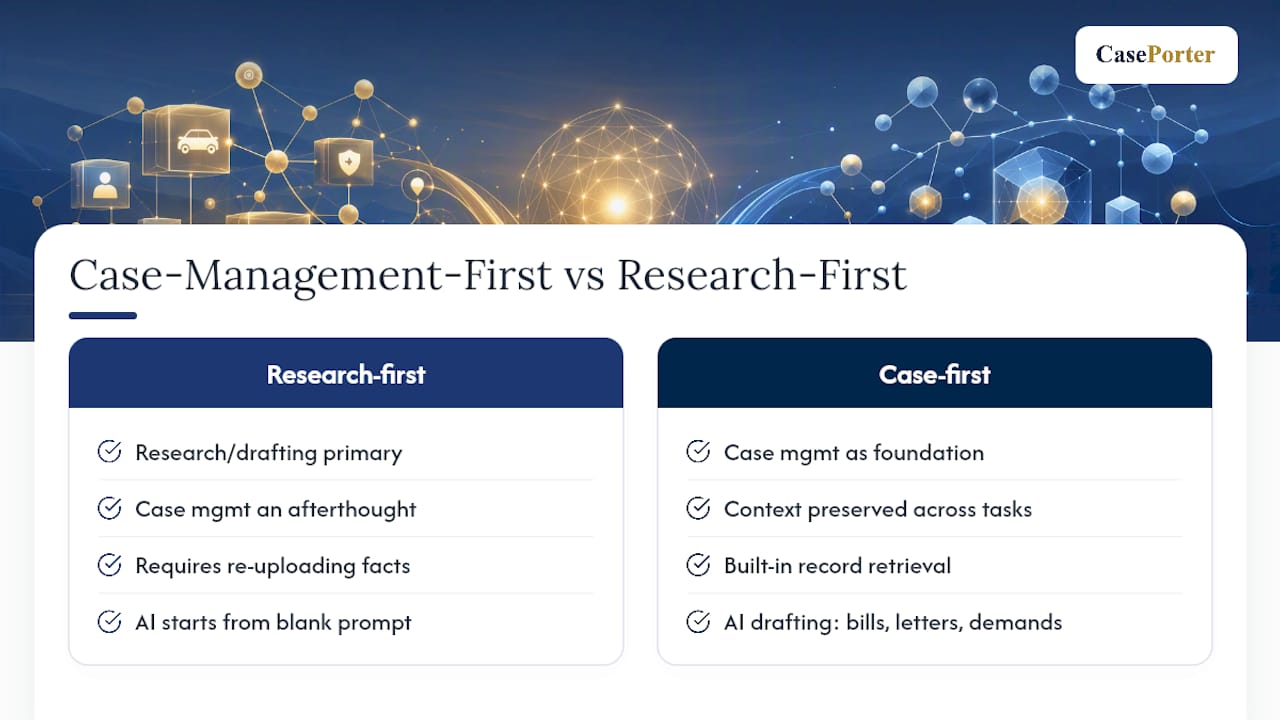
Most legal AI platforms are built around research or drafting as the primary function, with case management treated as an afterthought. For high-volume practice areas like personal injury, that ordering creates friction: every new AI feature requires re-uploading case facts that already live somewhere else in the firm's systems.
Some platforms take the approach of case management as the foundation, with AI-powered automation built into it rather than layered on top. That often includes automated medical-records retrieval and analysis, AI-assisted drafting for documents personal injury firms generate constantly, like Bills of Particulars, No-Fault Letters, and Discovery Demands, and transcript analysis that flags contradictions across depositions and statements.
The core advantage of a case-management-first design is that matter context never gets lost between tasks. When medical-records analysis, document drafting, and testimony review all sit inside the same platform, the AI already knows the facts of the case instead of starting from a blank prompt every time.
For firms handling a high volume of medical records and demand letters, this design avoids two of the most common pain points: per-document fees that scale unpredictably with caseload, and the repeated context re-entry that eats into the time savings AI is supposed to deliver. Some platforms are built with HIPAA compliance, encrypted communication, and audit trails as standard, not add-ons.
Yoseph, who covers legal technology adoption for this publication, notes that the platforms winning long-term firm trust are the ones built around how a case actually moves through a firm, not around a single task in isolation. You can review the platform's full feature set on the Caseporter product page.
What Does Legal AI Actually Cost Once You Account for Everything?
The subscription price or per-document rate on a vendor's pricing page is rarely the full cost of adoption. Total cost of ownership includes onboarding time, integration work, training hours, and the ongoing cost of reviewer time spent verifying AI output.
A tool priced cheaply per document can become the most expensive option in practice if your firm processes hundreds of medical records or demand letters per month. Practitioner experience suggests unpredictable per-document costs are one of the most common budget surprises firms report after adoption, since usage volume is difficult to estimate accurately before a tool is actually in production.
The hidden costs worth modeling before you sign anything:
- Training time. Every attorney and paralegal using the tool needs onboarding, and that time has a real cost even when the software itself is inexpensive.
- Integration work. Connecting a new AI tool to your existing document management system and email platform sometimes requires IT hours you did not budget for.
- Review overhead. If a tool's citation accuracy is unreliable, the reviewer time spent double-checking every output can erase the time savings the tool was supposed to deliver.
- Switching costs. If a tool does not integrate well and your firm needs to migrate to a different platform within a year, that transition has its own cost in disruption and retraining.
Run the math on a twelve-month basis, not a first-month demo basis. A tool that looks affordable in a sales pitch can cost more than a flat-fee subscription once your firm's actual document volume and review time are factored in.
What Legal Teams Get Wrong About AI Adoption
Most firms evaluating legal AI tools focus on the wrong first question. They ask "which tool has the best research engine" when the more useful question is "which tool understands the shape of our caseload." A research-first platform serving a litigation boutique with a handful of complex matters has different needs than a personal injury firm processing hundreds of medical records a month.
The conventional advice, "pick the tool with the most features," ignores that feature breadth often comes at the cost of workflow fit. A platform that treats case management as a bolt-on to a research engine will always require more manual context-passing than one built around the matter itself. That is not a minor inconvenience. It is the difference between a tool that saves an associate two hours a week and one that saves twenty.
If there's one priority to fix first, it's this: test citation accuracy and matter-context retention before you evaluate anything else. Speed and polish are easy to fake in a demo. Grounding and context persistence are not, and they are what determine whether the tool still works for you six months in in a high-volume practice.
— Yoseph
Ready to See Case-Management-First AI in Action?
If the procurement checklist above left you thinking about how much time your firm loses re-entering matter context across separate research, drafting, and records-review tools, that friction is exactly what a case-management-first platform is built to remove. Some platforms keep medical-records automation, document drafting, and transcript review inside one system built specifically for personal injury firms, with subscription pricing designed for firms processing high volumes of records and demand letters rather than per-document fees that scale unpredictably.

Some platforms include HIPAA-aware handling, encrypted client communication, audit trails, and team permissions built in from the start, aligning directly with the security and compliance criteria covered earlier in this guide. If your firm's biggest bottleneck is medical-records review or repetitive document drafting for Bills of Particulars, No-Fault Letters, or Discovery Demands, book a demo at Caseporter to see how the platform handles a real matter from your caseload.
FAQ
What Is the Best Legal AI Tool?
There is no single best tool for every firm; the right choice depends on practice area and caseload. Research-heavy litigation practices need strong citation-backed research engines, while high-volume personal injury firms often benefit more from a case-management-first platform like Caseporter that keeps medical-records automation and drafting in one matter context.
Is There a Legal Version of ChatGPT?
Several vendors have built legal-specific AI trained on supervised, curated legal data rather than the open internet, offering the citation traceability that general chatbots lack. Products like Thomson Reuters' CoCounsel and LexisNexis's Lexis+ AI are built specifically to ground outputs in primary legal sources.
Is There a Free AI Lawyer App?
Free consumer AI chatbots can answer general legal questions, but they are not grounded in verified legal databases and cannot substitute for licensed legal advice or professional case management. Any tool used for actual legal work should provide traceable citations and human review, which most free general-purpose apps do not offer.
Can ChatGPT Act as a Lawyer?
No. General-purpose AI models can hallucinate case citations, misstate holdings, and lack access to current, jurisdiction-specific legal authority, which is why Bloomberg Law's guidance recommends supervised, source-grounded legal AI instead. ChatGPT also is not built with the confidentiality protections or audit trails required for handling privileged client information.